5 Best HeyGen Alternatives in 2026: Dubbing Quality, Measured
We measured lip sync behavior, loudness, audio specs, and subtitle tracks across 5 HeyGen alternatives. Real output files, real numbers, September 2026.
Our first comparison covered the practical side of choosing an AI dubbing tool — free tiers, watermarks, pricing, signup friction. This post answers the harder question: whose output file actually holds up?
A dubbing tool lives or dies by the MP4 it hands back. So we took the real outputs from our September 2026 test round and measured them: lip-sync behavior, duration changes, loudness against broadcast standards, audio sample rates, subtitle tracks, codecs, and frame rates. Some of what we found — an empty subtitle stream, phone-grade mono audio, hyper-compressed loudness, a “dub” that never touches the video track — appears on no marketing page.
Quick picks
- Best measured output quality: AI Dubbing — automatic lip sync, full source resolution, working embedded subtitles, no watermark
- Loudest, most platform-ready audio: HeyGen — but compressed to near-zero dynamic range
- Best source-fidelity audio: ElevenLabs — loudness and timeline preserved, but no visual lip sync and a watermark on free exports
- Best export format selection: Dubverse — six formats, but the trial MP4’s audio is 22 kHz mono
- Best correction workflow: Rask AI — three alternative translations per segment, lip sync as a separate step
In this guide
- How we measured dubbing quality
- How the HeyGen alternatives compare on output quality
- Lip sync and the language-length problem
- Audio quality, measured in LUFS
- Subtitles and export internals
- Translation fidelity
- Technical verdicts: all 5 HeyGen alternatives
- When you should stick with HeyGen
- Frequently asked questions
- The bottom line
How we measured dubbing quality
We judge a dub on five dimensions, in order of importance:
- Translation fidelity — does the target-language script preserve meaning, names, numbers, and register?
- Lip sync — do mouth movements match the new audio, and how does the tool handle languages that take longer to speak?
- Voice and audio quality — loudness, dynamic range, sample rate, and how much of the original speaker survives
- Export internals — resolution, frame rate, codecs, bitrates, subtitle tracks
- Correction surface — when something is wrong, can you fix the script and re-dub, or start over?
Every number below comes from the actual exported files, inspected with ffprobe, EBU R128 loudness analysis, and frame-level image comparison. Where a tool produced no output in our test (VEED), we say so rather than speculate.
How the HeyGen alternatives compare on output quality
| AI Dubbing | HeyGen (free) | ElevenLabs (free) | Rask AI (trial) | Dubverse (trial) | |
|---|---|---|---|---|---|
| Test input | 9.6s English video ad | 8s English social clip | 15.2s English business clip | 14.4s English interview | 2-min English tutorial (trimmed) |
| Output | 11.33s French | 9.49s Mandarin | 15.22s German | 14.40s Canadian French | 120.03s French |
| Duration change | +18.0% (video retimed) | +18.7% (video retimed) | +0.1% (audio fit to timeline) | 0.0% (audio fit to timeline) | None (no lip sync) |
| Video track | Re-rendered (lip sync) | Re-rendered (lip sync) | Pixel-identical to source | Untouched (lip sync = separate action) | Untouched |
| Resolution | 720×1452 (source kept) | 720×1280 | 1280×720 (source kept) | 1280×720 (source kept) | 1280×720 @ 192 kbps video |
| Frame rate | 30 → 25 fps | 30 → 25 fps | 30 fps kept | 30 fps kept | 30 fps kept |
| Audio | 48 kHz stereo, 126 kbps | 48 kHz stereo, 128 kbps | 48 kHz stereo | 44.1 kHz mono | 22.05 kHz mono, 70 kbps |
| Loudness | -27.1 LUFS, LRA 3.8 | -10.4 LUFS, LRA 0.9 | -20.0 LUFS, LRA 2.7 | -24.5 LUFS, LRA 4.1 | -28.9 LUFS, LRA 3.6 |
| Subtitles | Embedded French track | Empty subtitle stream | No subtitle track | No subtitle track | Separate SRT/VTT export |
| Watermark | None | Yes | Yes — “Dubbed with ElevenLabs” | Yes — “TRANSLATED BY RASK” | None |
Different source clips — so read this as five output profiles, not a same-clip shootout. A standardized same-clip re-test is planned, and we’ll update both posts when it’s done.
Here is the AI Dubbing pair, so you can judge the dimension we can’t compress into a table:
Press play to compare — and note the duration difference, which is the lip-sync strategy working, explained below.
And here is the HeyGen free-plan pair — original on the left, their Mandarin dub on the right. Watch for the watermark burned into the bottom-right corner of every output frame, and play it to hear what -10.4 LUFS of compression sounds like:
The watermark is on every frame until you pay for Creator, the downloaded file’s subtitle stream is empty, and the audio is the hyper-compressed -10.4 LUFS export from the measurements below. From our September 2026 test.
Lip sync and the language-length problem
The hardest problem in video dubbing isn’t translation — it’s that languages take different amounts of time to speak. Our 9.6-second English ad needs about 11 seconds of French. A dubbing tool has three options:
- Speed up the translated speech — fits the timeline, sounds rushed and unnatural
- Leave the video untouched — fit the audio to the original timeline and accept that mouth movements won’t match
- Retime the video to fit the speech — the quality-preserving choice
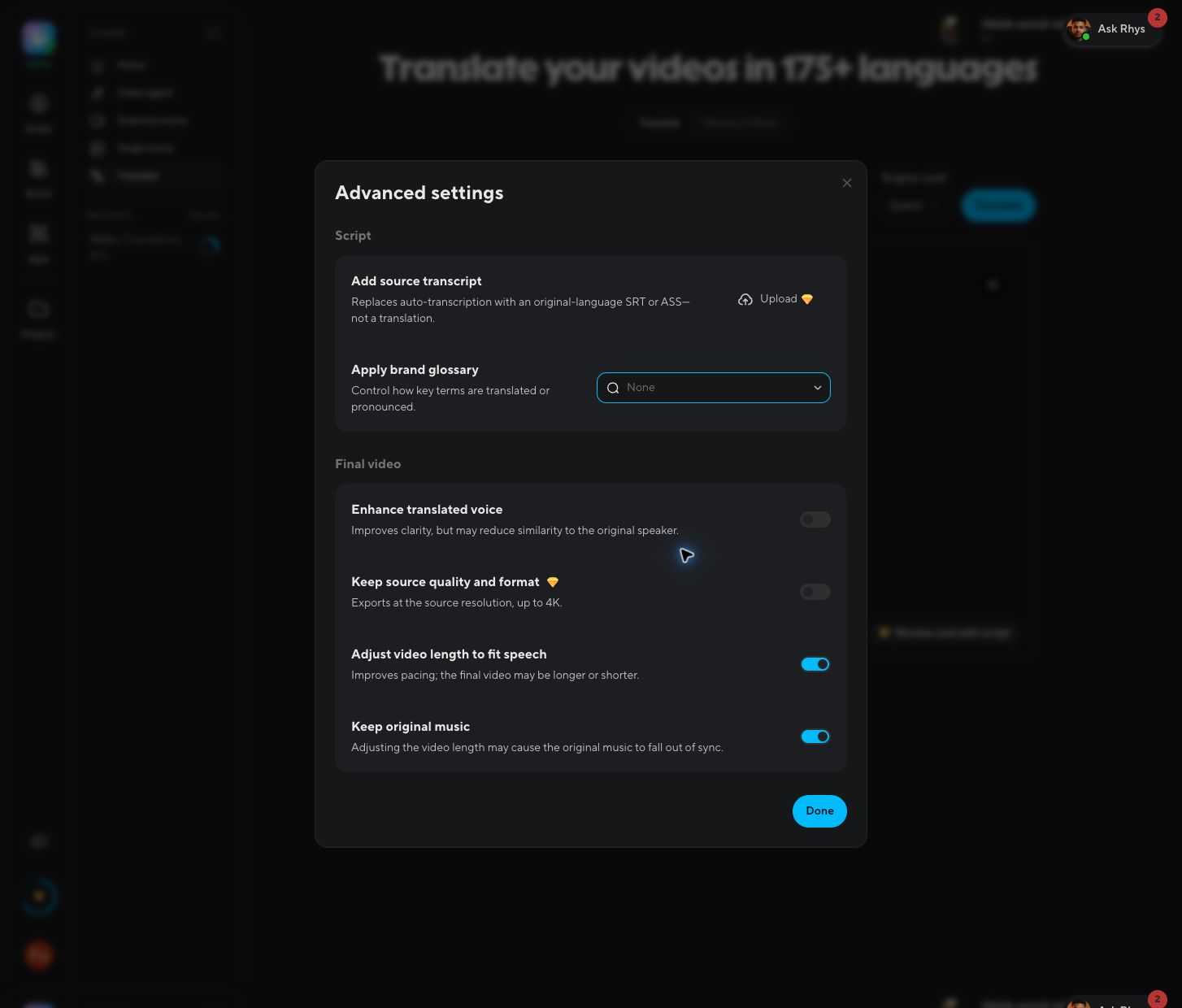
Both lip-synced outputs in our test chose option 3. AI Dubbing stretched 9.6 seconds of English into 11.3 seconds of French (+18.0%), keeping the presenter’s mouth aligned with the new audio. HeyGen did the same with our 8-second social clip, producing 9.5 seconds of Mandarin (+18.7%) — its “Adjust video length to fit speech” setting is on by default, and the interface honestly warns that it “may make the final video longer or shorter.”
ElevenLabs chose option 2 — and we can prove it. Its German dub of our 15.2-second business clip came back at 15.22 seconds (+0.1%), and frame-by-frame comparison shows the video track is pixel-identical to the source, mouth region included; only the audio changed. ElevenLabs’ Dubbing v2 fits the translated speech to your existing timeline rather than touching a single frame. Watch the pair — spot the difference between the two videos (there isn’t one, and that’s the point):
Same frames, new voice. For voice-over content that’s fine; for talking-head footage the mouth tells on the dub. Note the “Dubbed with ElevenLabs” watermark on the free-tier export.
Rask AI’s default trial output behaves like ElevenLabs’: our Canadian French dub of a 14.4-second interview came back at 14.40 seconds — duration unchanged, mouth region pixel-identical to the source at every timestamp we sampled (the visible “TRANSLATED BY RASK” watermark in the top-right corner accounts for the only frame differences). To Rask’s credit, this is an explicit product model rather than a hidden limitation: the result page offers three states — Original / Translated / Lip-synced — with lip sync as a separate action, gated to higher tiers for multi-speaker videos. Dubverse rounds out the group with no lip-sync option anywhere in its editor.
Rask’s trial output: new Canadian French voice over the original, unmodified video — the “TRANSLATED BY RASK” watermark sits top-right. From our September 2026 test.
One caveat for editors: both lip-synced exports (AI Dubbing and HeyGen) came back at 25 fps from 30 fps sources. Harmless for social publishing, but if the dubbed footage needs to cut together with 30 fps material in an NLE, conform it first. ElevenLabs, Rask AI, and Dubverse kept the original frame rate.
Audio quality, measured in LUFS
Loudness is where the outputs diverge most. For context: YouTube normalizes playback to roughly -14 LUFS, and broadcast targets sit at -23 to -24 LUFS. The integrated loudness and loudness range (LRA — higher means more natural dynamics) of our files:
| File | Integrated loudness | LRA | True peak | Reading |
|---|---|---|---|---|
| Original English ad | -21.9 LUFS | 6.4 LU | -5.7 dBFS | Typical social-media master |
| AI Dubbing French | -27.1 LUFS | 3.8 LU | -11.2 dBFS | Clean dynamics, but 5 LU quieter than source — add a volume bump before publishing |
| HeyGen Mandarin | -10.4 LUFS | 0.9 LU | -1.9 dBFS | Extremely loud and heavily compressed — LRA under 1 LU means almost no dynamic range left |
| ElevenLabs German | -20.0 LUFS | 2.7 LU | -5.5 dBFS | Closest to its source (-22.1 LUFS) — the best loudness preservation in the test |
| Rask AI Canadian French | -24.5 LUFS | 4.1 LU | -7.8 dBFS | 2.2 LU below source; healthy dynamics, but note the mono downmix below |
| Dubverse French | -28.9 LUFS | 3.6 LU | -7.8 dBFS | Quiet, and see the sample-rate problem below |
Two opposite failure modes on display. HeyGen’s output is hot: -10.4 LUFS is louder than any major platform’s target, and an LRA of 0.9 LU is the signature of aggressive limiting — every syllable slammed to the same level. It sounds “punchy” for three seconds and fatiguing after thirty; platforms will also turn it down on upload, which can expose pumping artifacts. Ours and Dubverse’s sit at the other extreme — quiet enough that viewers on phones will reach for the volume button. ElevenLabs lands in between: within ~2 LU of its source, the only tool that essentially preserved the original mix level.
The finding we’re most comfortable criticizing, because it’s ours: the AI Dubbing export should ship closer to the source’s loudness. Until it does, plan on a +5 dB normalization step. (HeyGen’s number isn’t a target to emulate — it’s the opposite one.)
Then there are the two mono downgrades. Rask AI’s output is 44.1 kHz mono — full frequency range, but the original stereo image is collapsed. Dubverse goes further: 22.05 kHz mono at 70 kbps. Half the standard sample rate means everything above ~10 kHz — sibilance, air, room tone — is simply gone, and mono collapses the stereo image on top. For a voice-only tutorial either passes; for anything with music or ambience, Dubverse’s sounds like a phone call. Their separate WAV export may fare better, but the default MP4 is what most users will publish.
Subtitles and export internals
Three small discoveries that matter in real workflows:
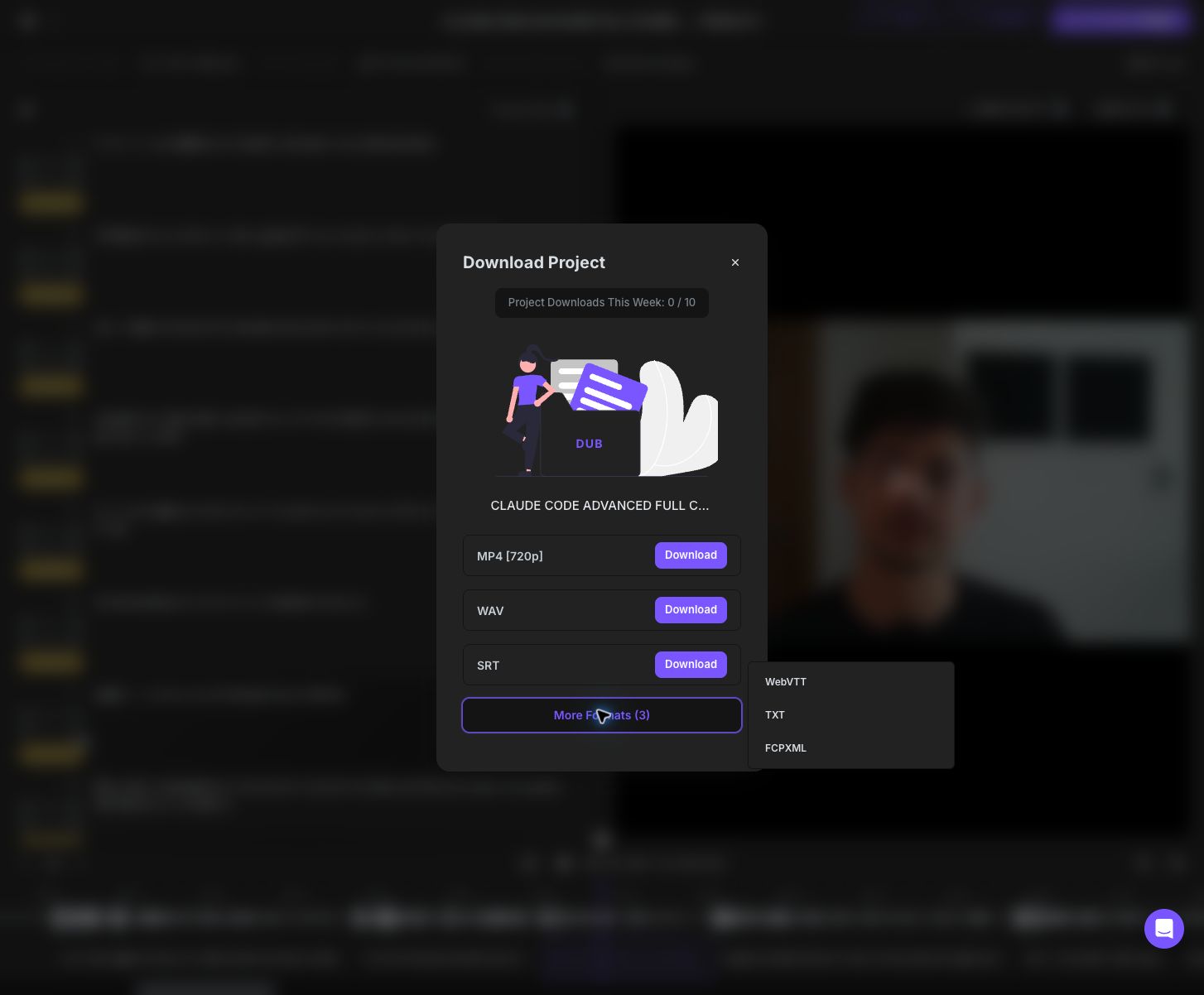
Embedded subtitles. The AI Dubbing MP4 carries a working French mov_text subtitle track — players that support soft subtitles can toggle it, and the text is real, usable French (excerpt in the next section). The HeyGen export also contains a mov_text stream, but extracting it yields zero bytes — the captions you see in HeyGen’s web player do not survive the download. ElevenLabs’ and Rask AI’s MP4s contain no subtitle stream at all — in Rask’s case that’s notable, because the (paywalled) Export card on its result page advertises “the localized MP4 with dubbed audio and subtitles,” which is not what the free download contains. Dubverse doesn’t embed subtitles in the MP4 but exports separate SRT, WebVTT, and even Final Cut Pro XML files — six formats in total, the widest selection we tested. If your workflow depends on caption files, these distinctions matter.
Video bitrate. HeyGen re-encodes generously (2.9 Mbps for 720p — higher than needed, but safe). ElevenLabs re-encoded our 0.73 Mbps source to 2.2 Mbps with no visible change. AI Dubbing returned 2.1 Mbps against the 1.6 Mbps source. Dubverse’s trial MP4 ran at 192 kbps for 720p — acceptable only because our test content was a mostly static screen recording; motion-heavy footage would show compression artifacts at that rate.
Resolution. AI Dubbing kept the unusual 720×1452 vertical source frame exactly, and ElevenLabs kept 1280×720. HeyGen’s free plan exported 720×1280, with source-quality export (up to 4K) gated behind a paid entitlement.
Translation fidelity
The numbers above measure the container; translation is the content. From the AI Dubbing French subtitle track, the presenter’s skincare pitch came back as:
“Aujourd’hui, je vous recommande cette crème de soin. Elle contient des ingrédients sains et son prix est abordable. Si vous manquez cette réduction, vous devrez attendre une année de plus.”
This is written-register French, not transliterated English: “si vous manquez cette réduction” (“if you miss this discount”) is the idiomatic phrasing a native copywriter would choose, and the conditional “vous devrez attendre” is grammatically correct where a weaker engine would produce a calque of “you will have to wait.”
Dubverse’s 2-minute French SRT shows the same general competence at longer scale, and their Studio editor uniquely highlights characters-per-second per segment — surfacing exactly the pacing pressure that forces tools into the length problem described above. Rask AI goes further on correction surface: every segment offers three alternative translations plus an “Apply changes” re-dub action, so a bad line costs a click, not a re-generation.
Two honest gaps in our own evidence. First, each tool received a different source clip, so translation quality isn’t yet directly comparable line-by-line — the standardized same-clip re-test will fix that. Second, HeyGen’s Mandarin and ElevenLabs’ German outputs deserve native-speaker review before we grade them; we’ve measured their containers thoroughly but won’t pretend a loudness number says anything about whether the language is good.
Technical verdicts: all 5 HeyGen alternatives
1. AI Dubbing — the most complete export
Automatic lip sync on every dub with the quality-preserving retime strategy (+18.0% on our French test), full source resolution kept, 48 kHz stereo audio, working embedded subtitles, no watermark. Processing ran about two minutes for a 9.6-second clip at 4 credits per second. The weaknesses are measurable too: output loudness runs ~5 LU below source (normalize before publishing), exports convert 30 fps to 25 fps, and the language catalog (20+) is smaller than HeyGen’s advertised 175+. No glossary or script-editing surface — what you upload is what gets translated.
2. HeyGen — strong engine, lossy free tier
The core pipeline is solid: correct retime strategy (+18.7% on our Mandarin test), honest advanced settings that expose real tradeoffs — “Enhance translated voice” warns it may reduce similarity to the original speaker — and a Glossary & Rules system (pronunciation pinning, force-translate, don’t-translate via CSV) that is the most developed quality-control surface we tested. But the free export degrades what the engine produces: a burned-in watermark, an empty subtitle stream, and hyper-compressed -10.4 LUFS audio. Script editing, proofreading, and source-quality export are paid entitlements.
3. ElevenLabs — best audio fidelity, but the mouth stays home
Now measurable, and the numbers are genuinely good: loudness within ~2 LU of the source (the best preservation in the test), 48 kHz stereo, original resolution and frame rate kept, and a timeline so faithful the output differs by 0.02 seconds. The catch is what “dubbing” means here: the video track is pixel-identical to the source — ElevenLabs fits translated speech to your existing lip movements rather than re-rendering them, so talking-head footage will read as a voice-over, not a dub. Free exports carry a “Dubbed with ElevenLabs” watermark, the MP4 has no subtitle track, and clips under 11 seconds are rejected outright. For voice-over-style content where the speaker’s face isn’t the focus, this is the strongest audio in the test; for visible speakers, it’s the wrong tool.
4. Rask AI — best correction surface, lip sync costs extra
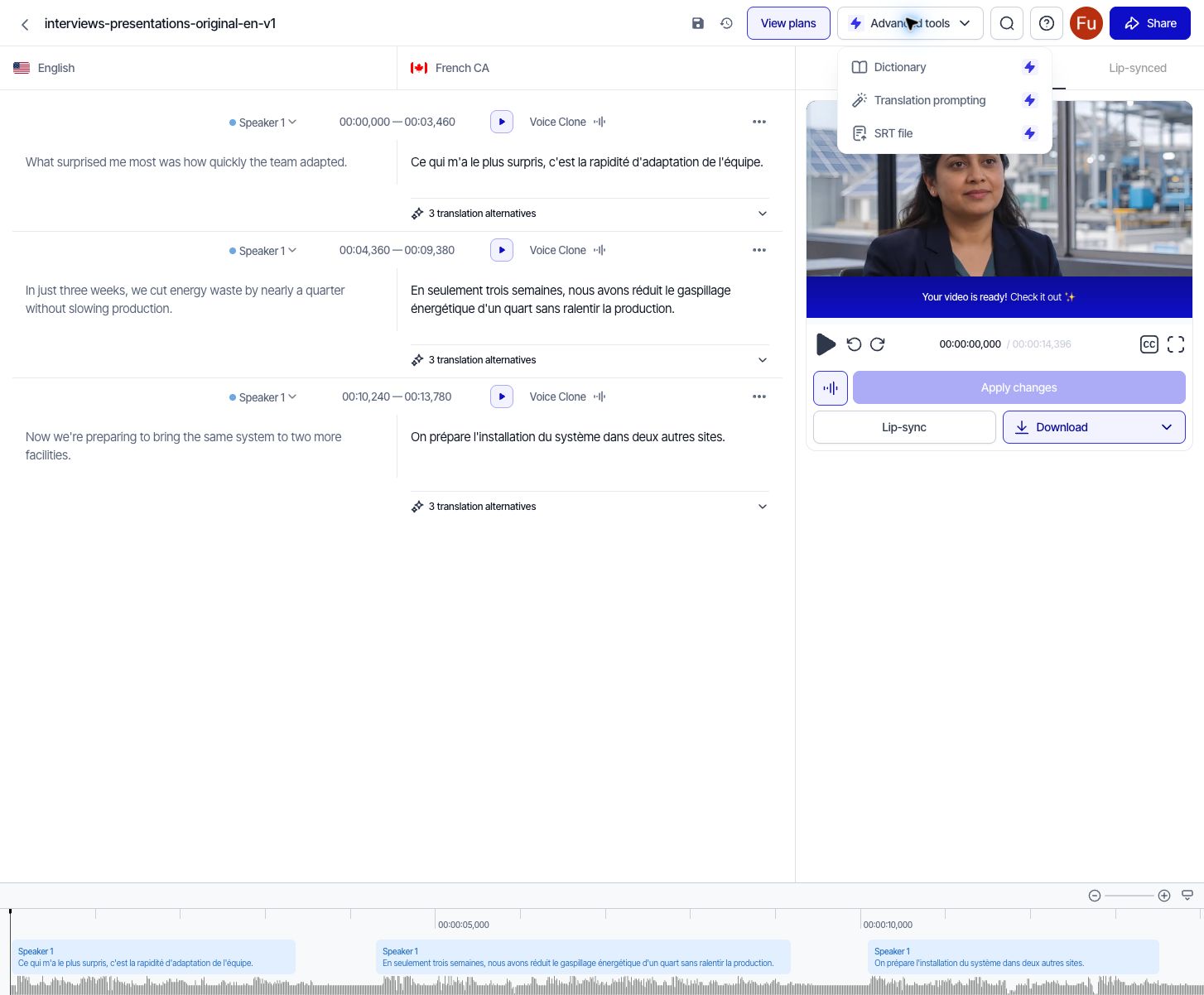
The only tool where a mistranslation doesn’t mean a failed generation: three alternative translations per segment, per-segment voice-clone controls, a waveform timeline, version history, and re-dub on demand.
Now measured on output files too. Our 14.4-second interview came back as 14.40 seconds of Canadian French — duration unchanged, resolution and frame rate kept, loudness a reasonable 2.2 LU below source with healthy dynamics (LRA 4.1). The compromises: 44.1 kHz mono audio, a “TRANSLATED BY RASK” watermark in the top-right corner, no subtitle track in the MP4, and a default output that leaves the mouth untouched — lip sync is a separate action, and multi-speaker lip sync requires Creator Pro ($78/mo billed yearly).
One UX detail worth correcting the record on, because other reviews (including our first post) describe the trial download as hard to find. The result page’s Export button is indeed paywalled — it carries a lock icon and opens the pricing screen:
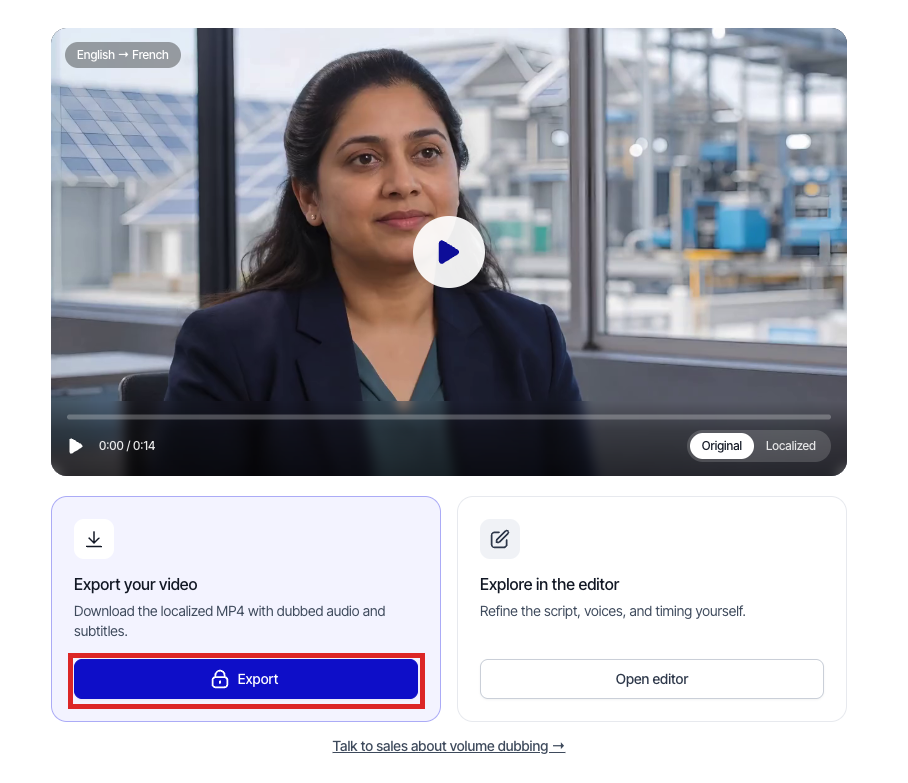
But the trial does provide a usable download path: open the editor and use the Download control there. That output is what we measured — watermarked but complete (the side-by-side pair in the lip-sync section above shows exactly what the free download contains). If your quality bar requires human review of every line, this is the workflow built for it — just know the default download is a voice-over, and true lip sync costs extra.
5. Dubverse — widest export selection, weakest audio
Six export formats (MP4, WAV, SRT, WebVTT, TXT, FCPXML), unwatermarked trial output, the best pre-generation cost disclosure we saw, and a CPS-highlighted transcript editor that catches pacing problems before export. But the trial MP4’s audio is 22.05 kHz mono at 70 kbps — a generational step below the 48 kHz stereo from the other tools — and there is no lip sync at all. Fine for voice-over-style content where the speaker’s mouth isn’t the focus; disqualifying for talking-head footage.
6. VEED — still unmeasurable
One disclosure carried over from our first post: VEED’s dubbing is hard-paywalled on free accounts — the 240 included credits can’t be spent on it, and clicking “Dub Video” opens a checkout. A quality review requires an output file, and VEED produced none. It gets re-evaluated if a future test round includes a paid account.
When you should stick with HeyGen
Technically, HeyGen still wins three specific fights:
- Terminology control at scale. Its Glossary & Rules system — reusable pronunciation, force-translate, and don’t-translate rules importable by CSV — is better than anything else we tested. If brand terms drive your quality requirements, this matters more than any single output file.
- Avatar generation. HeyGen is an avatar platform first. If your workflow is generating presenters from scripts rather than dubbing existing footage, none of these alternatives replace that.
- Paid-tier headroom. 175+ languages, 4K source-quality export, and script proofreading exist — on paid plans. If you’re already paying, the free-tier weaknesses we measured mostly disappear.
If your job is “dub this real footage, with lip sync, and get a file worth publishing,” the measured evidence points elsewhere.
Frequently asked questions
Which HeyGen alternative has the best lip sync?
In our September 2026 tests, only two tools actually re-rendered the speaker’s mouth: AI Dubbing (automatic on every dub) and HeyGen. Both retime the video to fit the translated speech. ElevenLabs leaves the video track pixel-identical and fits the audio to the original timeline, Dubverse’s editor showed no lip-sync option, Rask AI gates multi-speaker lip sync behind its $78/mo Creator Pro plan, and VEED’s lip-sync toggle opens a paid checkout.
Is there a free HeyGen alternative without a watermark?
Yes — two of the tools we measured. AI Dubbing produced unwatermarked output with no sign-up required, and Dubverse’s 3-day trial exported a clean MP4 capped at 2 minutes. HeyGen’s free plan watermarks every frame (removal requires Creator at $24/mo billed yearly), Rask AI’s trial stamps “TRANSLATED BY RASK” on the video, and ElevenLabs’ free exports carry a “Dubbed with ElevenLabs” mark.
Why is my AI-dubbed video longer or shorter than the original?
Because languages take different amounts of time to speak. Tools with true lip sync retime the video so mouth movements stay aligned: in our tests, a 9.6-second English ad became an 11.3-second French dub (+18%), and HeyGen stretched an 8-second English clip to 9.5 seconds of Mandarin (+18.7%). ElevenLabs takes the opposite approach — it fits the translated speech to the original timeline, so the video length barely changes (15.20s to 15.22s in our test).
What audio quality do AI dubbing tools export?
It varies more than marketing pages suggest. In our measurements: ElevenLabs stayed closest to the source (-22.1 to -20.0 LUFS, 48 kHz stereo), HeyGen exported loud but hyper-compressed audio (-10.4 LUFS, LRA 0.9), AI Dubbing exported clean 48 kHz stereo but 5 LU quieter than source (-27.1 LUFS), Rask AI downmixed to 44.1 kHz mono, and Dubverse’s trial MP4 carried 22.05 kHz mono audio at 70 kbps — phone-call grade. Check the exported file, not the spec page.
Do AI-dubbed videos include subtitles?
Sometimes, and not always where you’d expect. Our AI Dubbing export embedded a working French subtitle track in the MP4. Our HeyGen free export contained a subtitle stream that was completely empty — the captions visible in HeyGen’s player did not survive the download. ElevenLabs’ and Rask AI’s MP4s had no subtitle stream at all. Dubverse doesn’t embed subtitles but exports separate SRT and WebVTT files.
Do AI dubbing tools change my video’s resolution or frame rate?
They can. Both lip-synced outputs in our test came back at 25 fps from 30 fps sources, while ElevenLabs and Dubverse kept the original frame rate and resolution. HeyGen reserves source-quality export (up to 4K) for paid plans, while AI Dubbing returned the full 720×1452 source resolution. If frame rate or resolution matters for your editing pipeline, verify a test export before committing.
The bottom line
Measured on output files rather than feature lists, the HeyGen alternatives separate cleanly. AI Dubbing produced the most complete export — automatic lip sync with the correct retime strategy, full source resolution, working embedded subtitles, no watermark — with one honest flaw, audio that needs a volume bump. HeyGen’s engine is genuinely good but its free tier hands you a degraded version of it. ElevenLabs preserves your timeline and loudness better than anyone but never touches the mouth — a voice-over tool, not a lip-sync tool. Dubverse wins on export formats and loses on audio quality. Rask AI is the only tool where fixing a bad line doesn’t mean starting over. VEED alone produced nothing we could measure.
For free tiers and signup friction, see Best AI Dubbing Software in 2026: 6 Tools Tested and Compared. For current plan math and project scenarios, see How Much Does AI Dubbing Cost?. For everything else, the advice is the same as before: run your own clip through your top two, and measure what comes back.