Best AI Dubbing Software in 2026: 6 Tools Tested and Compared
We tested 6 AI dubbing tools with real videos in 2026. Compare free plans, watermarks, lip sync, editing controls, and the true cost per minute.
The best AI dubbing software in 2026 is not the tool with the longest language list — it is the one that returns a publishable video for your content type, at a cost that still makes sense after retries and corrections.
In September 2026 we created fresh accounts on six AI dubbing tools and tested them with real uploads. Some of what we found does not appear on any pricing page: one tool’s free credits turned out to be unusable for dubbing, one rejected our short clip outright, and one put a watermark on the translated video that its landing page never mentioned.
Quick picks
- Best overall quality: AI Dubbing — accurate translation and natural lip sync, with a preview before you spend anything
- Best voice platform, with caveats: ElevenLabs — 10,000 free credits, but clips under 11 seconds are rejected
- Best for short social clips: HeyGen — the only tool that dubbed our 8-second video for free
- Best for teams and volume: Rask AI — three alternative translations per segment, batch features on higher tiers
- Best transcript editor and cleanest trial exports: Dubverse — no watermark, six export formats
- Skip if you want to test before paying: VEED — 240 free credits that cannot be used for dubbing
Full reviews, test data, and a side-by-side table below.
In this guide
- How we tested
- The best AI dubbing tools in 2026, compared
- 1. AI Dubbing — best overall quality
- 2. ElevenLabs — best voice platform, with caveats
- 3. HeyGen — best for short social clips
- 4. Rask AI — best for teams and volume
- 5. Dubverse — best transcript editor and cleanest trial exports
- 6. VEED — polished, but no usable free trial
- Video dubbing software not covered in this test
- How to test AI dubbing software yourself
- Free video dubbing software: plans and the real cost per finished minute
- Which AI dubbing tool should you choose?
- Frequently asked questions
- The bottom line: the top AI dubbing software in 2026
How we tested
We created new accounts on each platform in the first week of September 2026 and tested with real uploads: an 8-second English social clip, a 9.6-second video ad with a clearly visible presenter, and a 14.4-second interview excerpt. Target languages included French and Mandarin. As a stress test, we also submitted a 3-hour-18-minute YouTube course video to see how each tool handles extreme input.
For each tool we recorded what the free tier actually allows (versus what the marketing page implies), processing behavior, editing controls, export formats, watermarks, and credit accounting. Prices below were captured from live in-app billing screens on September 1–2, 2026 — where they differed from public pricing pages, we report the in-app figures.
Two honest caveats. First, we did not run the identical clip through every tool in this round; a standardized same-clip re-test is planned, and we will update this article when it is done. Second, ElevenLabs and VEED did not produce a dubbed output within their free tiers — for different reasons, explained in their reviews. We consider that a finding, not a gap we should hide.
The best AI dubbing tools in 2026, compared
| Tool | Best for | Languages | Voice cloning | Lip sync | Free tier reality | Starting price |
|---|---|---|---|---|---|---|
| AI Dubbing | Best overall quality | 20+ | Yes — original speaker’s voice | Yes, automatic | Trial credits, no sign-up | See pricing |
| ElevenLabs | Voice-first workflows | 92 advertised (Dubbing v2 alpha) | Automatic, claimed | “Automatic sync,” claimed | 10,000 credits, but clips under 11s rejected | $6/mo Starter |
| HeyGen | Short social clips | 175+ advertised (30+ on free) | Creator plan and up | Offered; not verified in our free test | 3 videos/mo, up to 1 min, watermark | $24/mo Creator, billed yearly |
| Rask AI | Teams and volume | 130+ advertised | Per-segment control; saved voices on Pro | Separate action; multi-speaker on Pro | 7-day trial, 3 videos, watermarked | $33/mo Creator, billed yearly |
| Dubverse | Transcript control, clean exports | 64 target variants observed | Clone Speaker, 1 free in trial | Not available in tested editor | 3 days, 25 credits, 2-min cap, no watermark | $30/mo Pro ($15/mo yearly) |
| VEED | Existing VEED subscribers | 29 observed (50+ claimed on paid) | “Match Video Voice” offered | Gated behind paid checkout | 240 credits, but dubbing itself paywalled | $25/mo Creator ($12/mo yearly) |
“Advertised” figures come from the vendors’ own screens and were not independently verified across all languages. “Observed” figures are what our test account actually saw.
1. AI Dubbing — best overall quality
Best for: creators and teams who want the most faithful end result — accurate translation and natural lip sync — without an account, a sales call, or a complex studio workflow.
AI Dubbing is built around the two things that decide whether a dub feels professional: the translation has to carry the original meaning, and the speaker’s lip movements have to match the new audio. The tool handles both automatically — upload an MP4, WebM, or MOV file, choose from more than 20 target languages, and preview the lip-synced result before downloading it. That preview step matters: you review the actual dub before spending credits on it, so you never pay for a result you haven’t already watched. New accounts get trial credits, so you can verify the quality on your own content before paying anything.
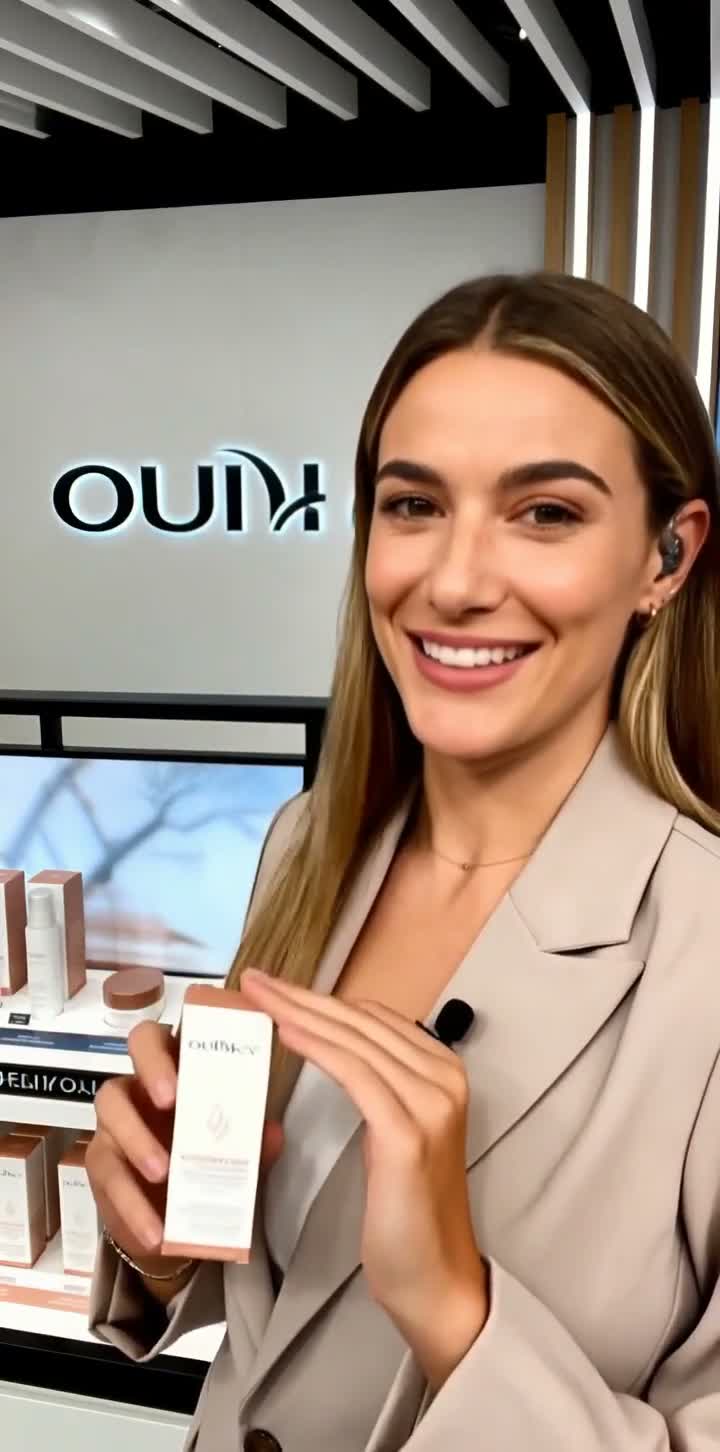
In our September 2026 test we uploaded a 9.6-second English vertical video ad with a clearly visible presenter and dubbed it into French. The finished, lip-synced video came back in about two minutes, with no watermark, at a cost of 38 credits (4 credits per second of video). Two details stood out. First, the output runs 11.3 seconds — longer than the source — because spoken French simply takes more time than the English original, and the engine stretched the video to keep the presenter’s lip movements aligned rather than compressing the speech. Second, the translation reads like written French, not transliterated English: the presenter’s skincare pitch came back as “Aujourd’hui, je vous recommande cette crème de soin… Si vous manquez cette réduction, vous devrez attendre une année de plus,” with an embedded French subtitle track included.
What we like:
- Automatic lip sync included in every dub — not a paid add-on or a separate step
- Translation preserves meaning, names, and numbers across the 20+ supported target languages
- No sign-up required to start, and you preview the finished dub before spending credits
What we don’t:
- 20+ languages is a smaller catalog than HeyGen or Rask AI advertise
- No batch-processing or team-review workflow for large catalogs
- Processing takes minutes, not seconds — our 9.6-second clip needed about two minutes end to end
Verdict: If you care most about how the finished video looks and sounds — faithful translation, natural lip sync, a voice that fits the speaker — this is the strongest result-per-effort in this list. If you need batch processing with reviewer roles across a large catalog, look at Rask AI. For current allowances and renewal terms, see AI Dubbing pricing.
2. ElevenLabs — best voice platform, with caveats
Best for: audio-first teams who prioritize voice realism and want dubbing inside a broader voice platform.
ElevenLabs built its reputation on voice quality, and dubbing is one feature inside its larger ElevenCreative workspace alongside text-to-speech, voice cloning, sound effects, and more. Its Dubbing v2 — labeled Alpha at test time — claims to preserve the original speaker’s emotion and delivery across 92 languages with automatic voice cloning and sync. We did not independently verify those claims, and you should read “alpha” as an honest stage label.
Two findings from our test matter more than the marketing. First, the onboarding paywall is softer than it looks: the plan screen can be skipped, and the resulting free account receives 10,000 credits with the Dubbing tool accessible. Second — and this one cost us a test — Dubbing v2 alpha rejects clips shorter than 11 seconds. Our 8-second social clip, which HeyGen and VEED both accepted, could not be dubbed at all. If your content is short-form, that minimum alone may disqualify it.
What we like:
- The voice library and cloning pedigree are the strongest in this list
- Free account is real: 10,000 credits after skipping the onboarding paywall
- Dubbing sits inside a full audio platform (TTS, voice changer, speech-to-text), useful if you need more than dubbing
What we don’t:
- 11-second minimum clip length excludes short social content
- Dubbing v2 is alpha-stage; the headline claims are unverified
- Dubbing is one feature in a large platform — more navigation overhead than dedicated tools
Verdict: The default choice when voice quality outranks everything else and your clips are longer than 11 seconds. Short-form creators should look elsewhere first.
Pricing (verified in-app September 1, 2026):
| Plan | Price | Credits/mo | Notes |
|---|---|---|---|
| Free | $0 | 10,000 | Dubbing accessible; clips under 11s rejected |
| Starter | $6/mo | 30,000 | Commercial license, Instant Voice Cloning |
| Creator | $22/mo | 121,000 | Professional Voice Cloning; $11 for the first month |
| Pro | $99/mo | 600,000 | 44.1 kHz PCM audio via API |
Higher tiers (Scale $299/mo, Business $990/mo, Enterprise custom) target volume buyers.
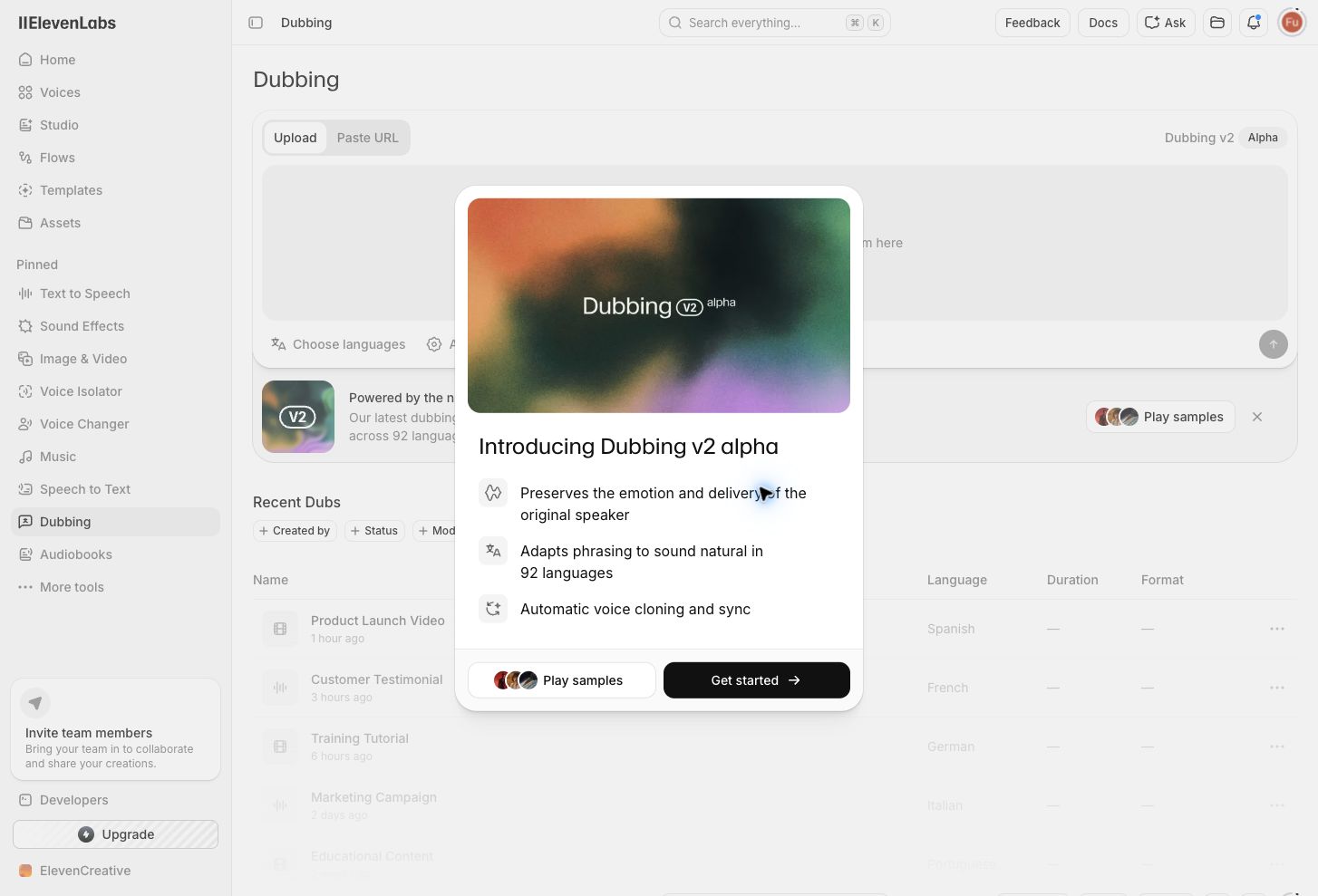
ElevenLabs Dubbing v2 (labeled “Alpha”) makes three big claims up front — we verified the 11-second minimum the hard way instead. Captured September 1, 2026.
3. HeyGen — best for short social clips
Best for: creators localizing short talking-head and social videos, especially where lip sync matters.
HeyGen is the only tool in this test that took our 8-second social clip and handed back a downloadable translation on a free plan — a 9-second Mandarin result with embedded captions, and no credits consumed. The free plan allows 3 videos per month up to 1 minute each, with 30+ languages; paid plans advertise 175+ languages and dialects.
The translate workspace is thoughtfully designed. Advanced settings surface real tradeoffs instead of hiding them: “Enhance translated voice” warns it may reduce similarity to the original speaker; “Adjust video length to fit speech” is on by default; a Glossary & Rules area lets you pin pronunciations, force translations, and protect brand terms (“Don’t Translate”) via CSV. Script editing and proofreading, however, are reserved for the Pro plan.
One UX blemish from our stress test: when we submitted a 3-hour-18-minute YouTube video — far outside every plan’s stated limit — the progress bar climbed to roughly 88%, then reset to 30% and cycled, with no error message. HeyGen should have rejected the input up front with a clear limit notice, the way Dubverse did.
What we like:
- Successfully dubbed an 8-second clip free — the shortest input any tool accepted and processed
- Honest advanced settings that explain quality tradeoffs before generation
- Reusable glossary, force-translate, and don’t-translate rules for brand terminology
What we don’t:
- Free exports carry a watermark (removal requires Creator)
- Script editing and proofreading are gated behind Pro ($41/mo billed yearly)
- Out-of-range input fails with a progress-bar reset instead of a clear error
Verdict: The strongest free-tier result in this test for short social clips. Just stay inside the 1-minute free limit — the tool won’t warn you gracefully when you exceed it.
Pricing (verified in-app September 2, 2026):
| Plan | Monthly | Billed yearly | What you get |
|---|---|---|---|
| Free | $0 | — | 3 videos/mo, up to 1 min each, watermark, 30+ languages |
| Creator | $29/mo | $24/mo ($288/yr) | 600 credits, 30-min videos, 1080p, voice cloning, 175+ languages, no watermark |
| Pro | $49/mo | $41/mo ($488/yr) | 1,000 credits, 4K export, script editing and proofreading |
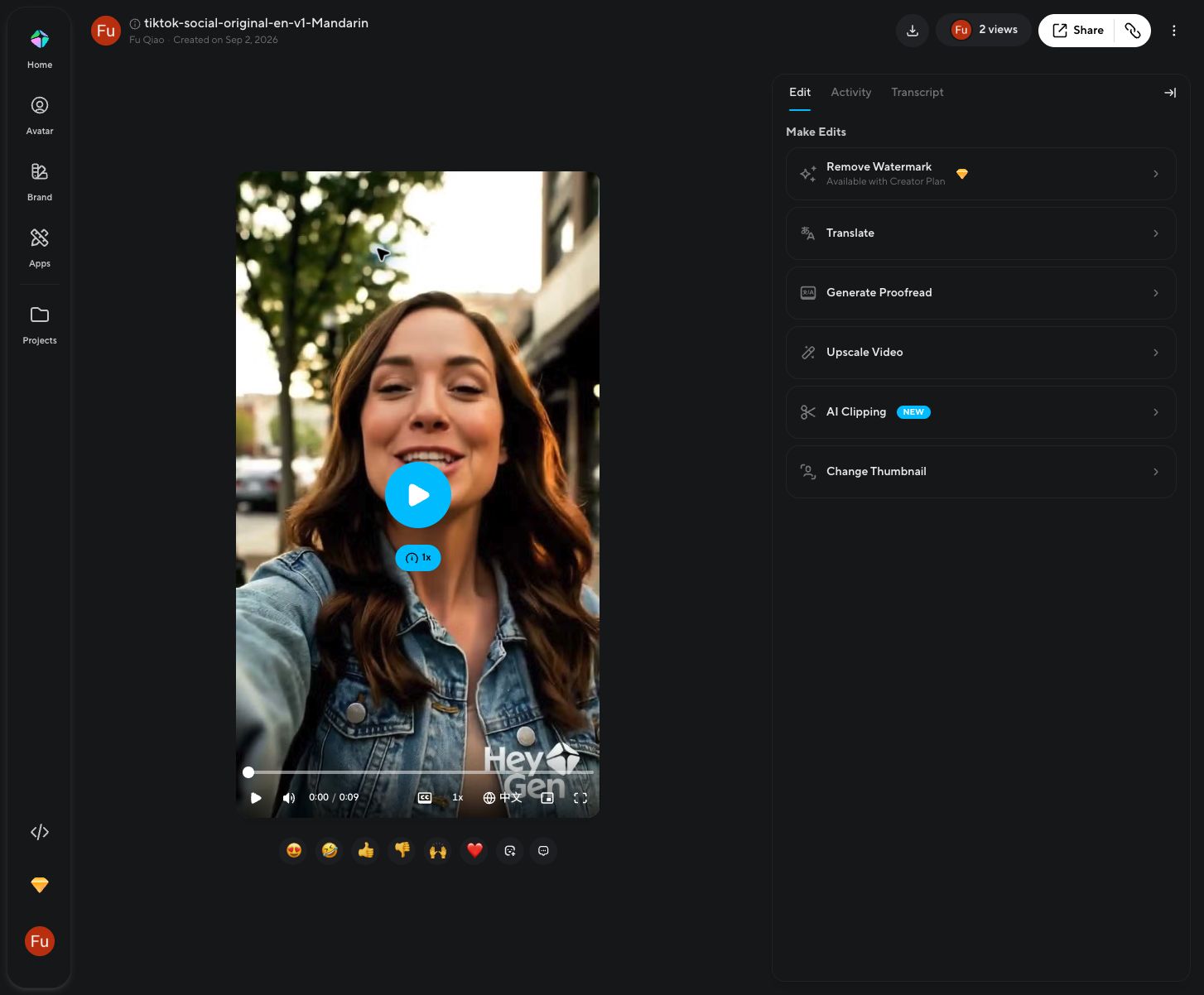
HeyGen’s completed Mandarin translation of our 8-second clip — the only free-tier dub we got from a sub-10-second source. Captured September 2, 2026.
4. Rask AI — best for teams and volume
Best for: agencies, course platforms, and channels that localize video continuously and need review workflows.
Rask’s trial is genuinely usable for evaluation: 7 days, 3 videos, no credit card. We localized a 14.4-second English interview excerpt into French and got the most editorially ambitious result page of the test — every transcript segment shows the original beside an editable translation, with three alternative translations per segment, a per-segment Voice Clone control, a waveform timeline for retiming, version history, and an “Apply changes” re-dub action.
Two free-tier realities to know. The translated download carries a visible “TRANSLATED BY RASK” watermark, and the result page’s Export button is paywalled (it opens the pricing screen); the working Download control lives in the editor, and its output stays watermarked. Also, the default result is not lip-synced — Rask models this honestly as three states (Original / Translated / Lip-synced) with lip sync as a separate action, and multi-speaker lip sync requires Creator Pro.
What we like:
- Three alternative translations per segment — the best correction workflow we tested
- Honest separation of “translated” and “lip-synced” output states
- Annual plans where unused minutes don’t expire monthly, with unlimited re-editing and re-dubbing
What we don’t:
- Watermark on free-tier output, and a paywalled Export button on the result page
- The features that justify “for teams” (multi-speaker lip sync, glossary, shared voices) start at Creator Pro, $78/mo billed yearly
- Additional minutes cost $3 each on Pro plans — overages add up fast at volume
Verdict: The right pick when dubbing is a recurring production line with reviewers, not a one-off task. Solo creators with occasional short clips will overpay.
Pricing (verified in-app September 2, 2026):
| Plan | Price (billed yearly) | Included time | What you get |
|---|---|---|---|
| Free trial | $0 for 7 days | 3 videos | Full editor access; watermarked output; no credit card |
| Creator | $33/mo ($396/yr) | 300 min/year | Single-video localization; no saved voices or glossary |
| Creator Pro | $78/mo ($936/yr) | 1,200 min/year | Multi-speaker lip sync, 3 saved custom voices, glossary |
| Business | $500/mo ($6,000/yr) | 6,000 min/year | Batch processing, team review, shared brand glossary |
Additional minutes on Creator Pro and Business: $3/minute. Enterprise is custom-priced.
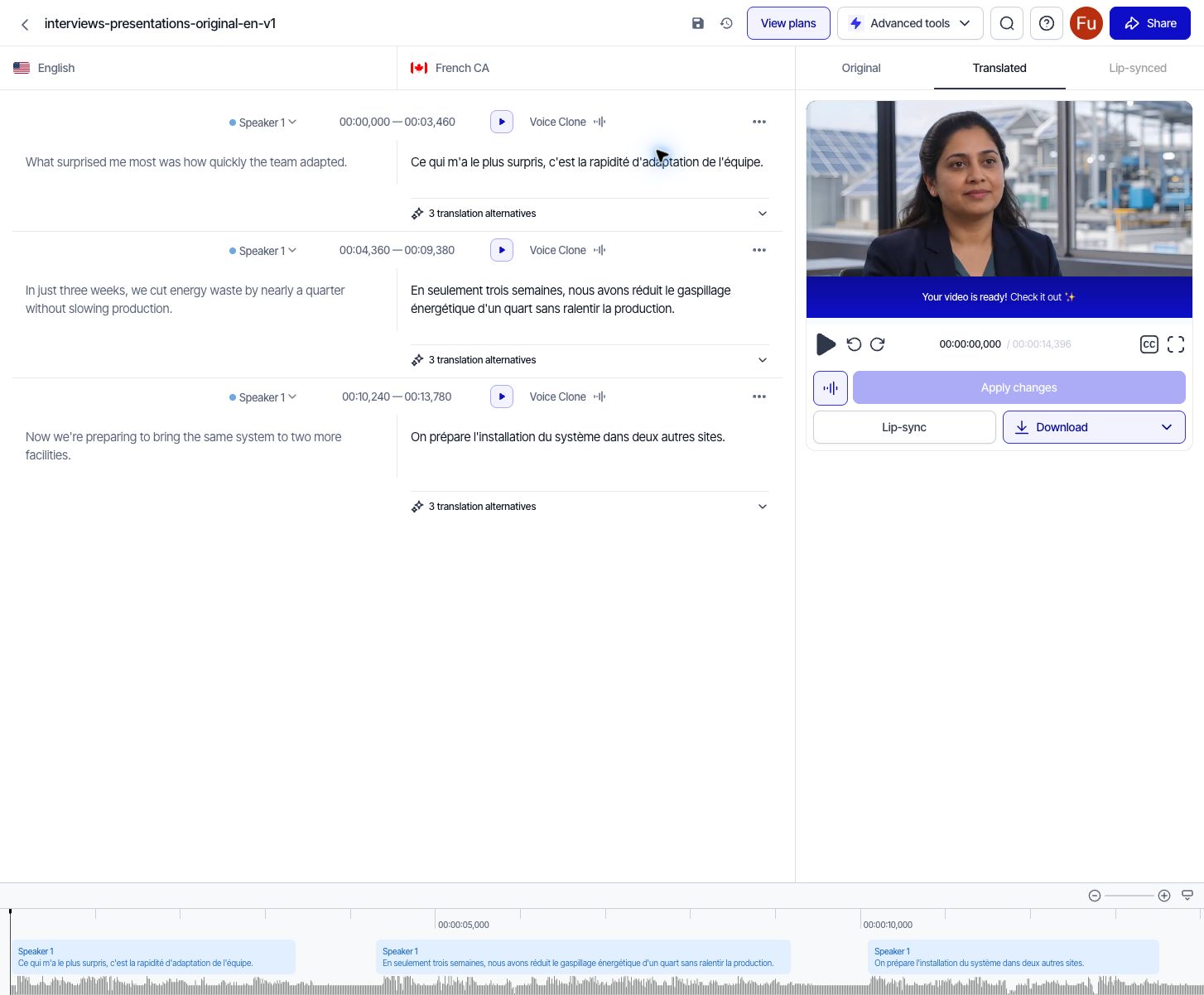
Rask AI’s bilingual editor: original and translation side by side, with alternative translations and per-segment voice controls. Captured September 2, 2026.
5. Dubverse — best transcript editor and cleanest trial exports
Best for: creators who want fine control over the translated script and timing — and anyone localizing into Indian languages.
Dubverse’s trial is tight but honest: 3 days, 25 credits, and a hard 2-minute output cap. Two things impressed us before any audio was generated. When we fed it the 3-hour-18-minute YouTube course video, Dubverse did what HeyGen didn’t: it analyzed the input, displayed the exact detected duration, disclosed that the trial would trim output to 2 minutes, and quoted the cost — 8 credits, confirming a rate of 4 credits per output minute — all before generation. And when the job finished, the credit deduction matched the quote exactly (25 → 17).
The Studio editor is the deepest we tested: numbered segments with timestamps, characters-per-second measurements with high values highlighted (so you can see reading-speed pressure before export), a source-text toggle, find and replace, AI-assisted script editing, and redo-by-range. Export options are equally thorough — MP4 (720p), WAV, SRT, WebVTT, TXT, even Final Cut Pro XML — and our trial MP4 had no watermark, a notable advantage over Rask’s free output.
The main weakness: no lip sync. Our cloned-speaker French dub preserved the speaker’s voice identity, but mouth movements stayed untouched, and the completed editor exposed no lip-sync action. Processing took about 5 minutes for the 2-minute output on the trial queue, with no progress percentage or ETA. Also note: trial projects are deleted after 15 days, so download immediately.
What we like:
- Best-in-test preflight: exact duration, trim disclosure, and cost quoted before generation
- Deepest transcript/timing editor, with CPS highlighting that catches pacing problems early
- Unwatermarked trial exports in six formats, including SRT and FCPXML
What we don’t:
- No lip-sync capability in the tested editor — audio dubbing only
- 2-minute trial cap and 15-day project retention
- ~5 minutes for a 2-minute dub on the trial queue, with no ETA (a paid “skip the queue” upsell appears)
Verdict: The strongest choice when you need to edit a dub, not just generate one — and the cleanest trial exports of any tool we tested. If visual lip sync is a requirement, look at HeyGen or Rask AI instead.
Pricing (verified in-app September 2, 2026; dubbing costs 4 credits per output minute):
| Plan | Monthly | Billed yearly | Credits/mo | What you get |
|---|---|---|---|---|
| Trial | $0 for 3 days | — | 25 total | 2-minute output cap, no watermark |
| Pro | $30/mo | $15/mo | 100 | Videos under 60 min, 1080p, “Hawk” (GPT-3.5-class) translations |
| Supreme | $50/mo | $25/mo | 100 | Voice cloning, “Eagle” (GPT-4-class) translations, videos under 150 min, 2160p |
Both paid plans advertise credit rollover and unlimited downloads.
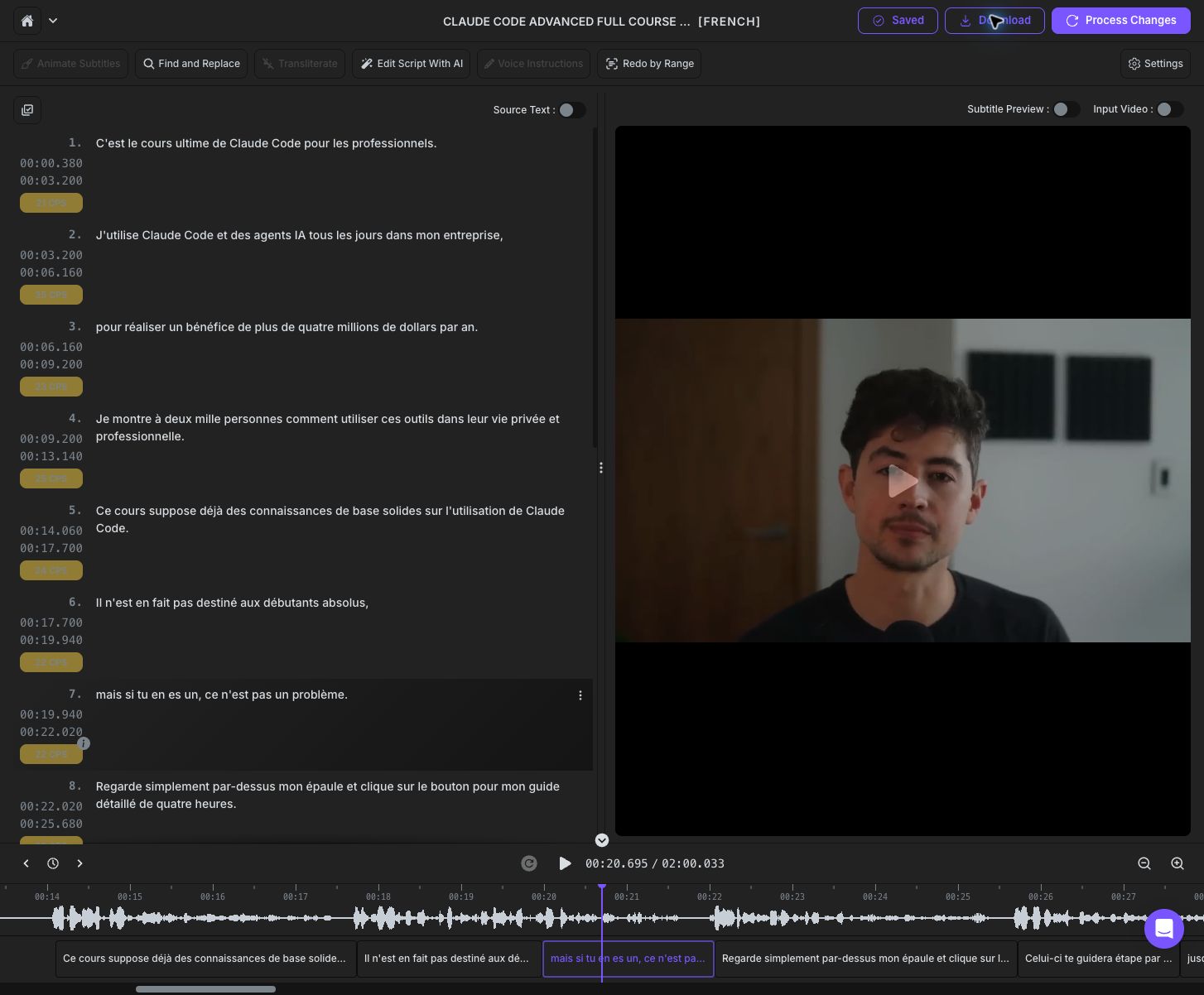
Dubverse’s Studio after our French dub: per-segment timestamps, CPS highlighting, and the deepest transcript controls we tested. Captured September 2, 2026.
6. VEED — polished, but no usable free trial
Best for: teams already paying for VEED’s editor who want dubbing in the same workspace.
VEED’s dubbing interface is genuinely polished: it accepted our 9.6-second ad clip without complaint (no 11-second minimum like ElevenLabs), offered 29 target languages in the workflow we saw, and gave thoughtful options — Match Video Voice, Similar AI Voice, named stock voices, and background-audio retention on by default.
Then the test ended. The new free workspace starts with 240 credits, but the AI Dubbing screen displayed “Upgrade to continue,” and clicking Dub Video opened a checkout instead of consuming credits. Lip sync opens the same checkout; proofreading is an Enterprise-only feature. In other words: the credits are real, the dubbing access is not. We could not evaluate translation quality, processing time, or export watermarks, because no generation was possible without paying. Two smaller gaps: no YouTube URL import (upload only), and the observed 29-language list is smaller than the “50+ languages” the paid plans advertise.
What we like:
- Clean configuration surface: voice matching, stock voices, background-audio retention
- No minimum clip length — accepted our 9.6-second video
- Dubbing lives inside a full video editor, if you already use VEED
What we don’t:
- Dubbing is effectively paywalled on free accounts — the 240 included credits can’t be used for it
- Lip sync and transcript upload gated behind paid checkout; proofreading is Enterprise-only
- No YouTube URL import
Verdict: Probably a fine dubbing add-on if you already subscribe to VEED for editing. As a tool to evaluate before buying, it fails the most basic test — you cannot try the thing it sells.
Pricing (verified in-app September 2, 2026):
| Plan | Monthly | Billed yearly | Credits | What you get |
|---|---|---|---|---|
| Free | $0 | — | 240 | Full video editor — but dubbing not included |
| Creator | $25/user/mo | $12/user/mo ($147/yr) | 500/mo | No watermark, unlimited auto subtitles |
| Pro | $45/user/mo | $22/user/mo ($265/yr) | 2,500/mo | Translation to 50+ languages, brand kits |
| Studio | $79/user/mo | $39/user/mo ($465/yr) | 15,000/mo | Up to 80 hours of AI features per month |
Proofreading and custom dictionaries are Enterprise-only (custom pricing).
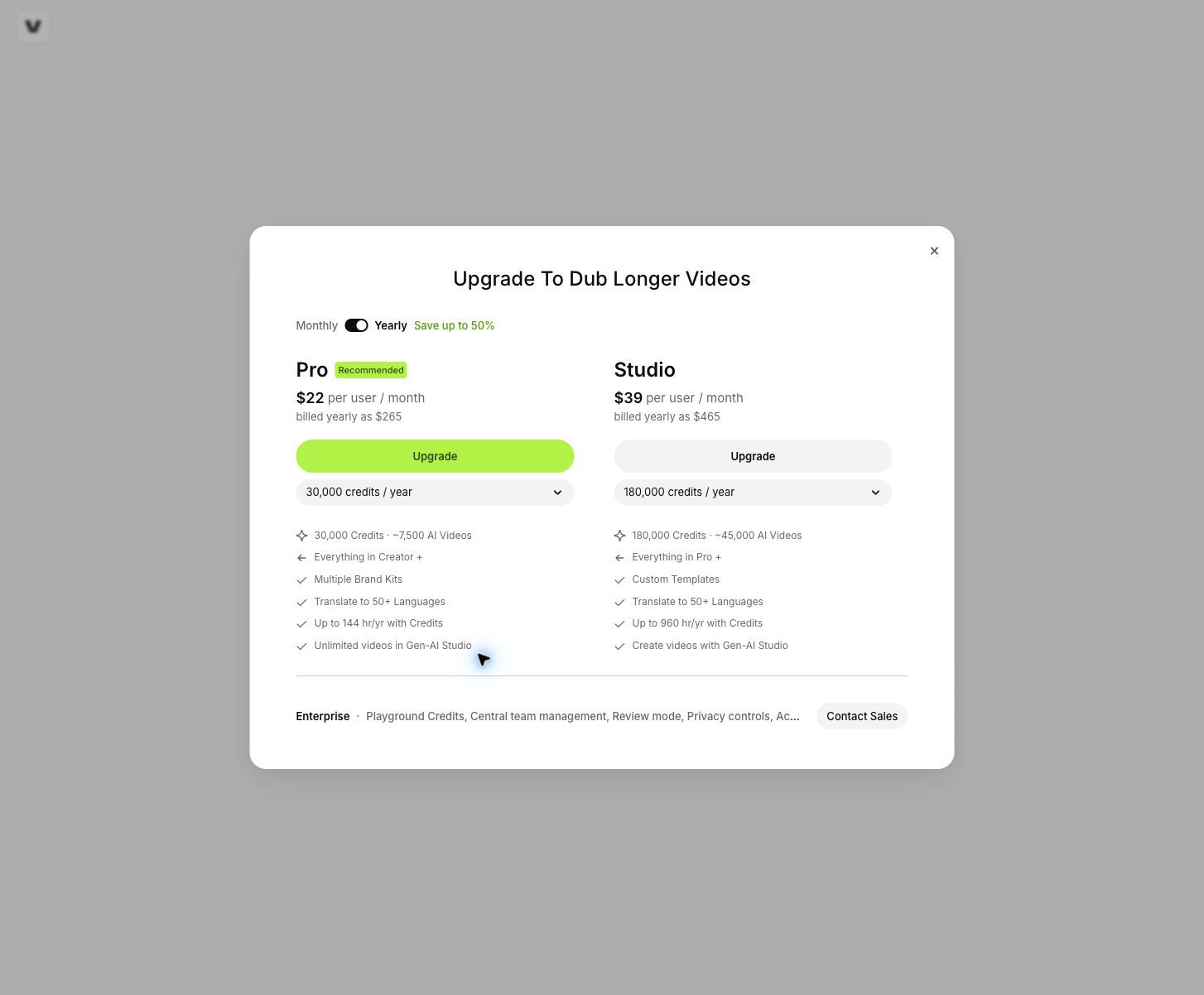
Clicking “Dub Video” on VEED’s free plan opened this checkout — the 240 included credits couldn’t be spent on dubbing. Captured September 2, 2026.
Video dubbing software not covered in this test
A few names come up often in AI dubbing conversations but target a different buyer than this list:
- Synthesia — an avatar video platform first; dubbing is an add-on. Strong for corporate training videos, less relevant if you need to dub existing footage.
- DeepDub, Papercup, 3Play Media — managed, human-in-the-loop services for broadcasters and enterprises, with sales-led pricing and no self-serve signup.
- YouTube auto-dubbing — free and automatic for eligible channels, but you cannot edit the output, and language pairs are limited. Fine as a baseline; not a substitute when quality matters.
How to test AI dubbing software yourself
Vendor demos always use flattering source material — and as our VEED and ElevenLabs results show, even getting a test output is not guaranteed. Before committing to any video dubbing software, run your own test with one 30–60 second clip that resembles your real work: a complete sentence, one proper name, one number, a natural pause, and some background sound. (Add 11 seconds of padding if you’re testing ElevenLabs.) Then review in this order:
1. Check the translation before judging the voice
A natural voice cannot rescue a wrong translation. Confirm the result preserves meaning and handles names, numbers, product terms, and calls to action correctly.
2. Listen without watching
Audio-only review makes pronunciation problems, unnatural pauses, volume jumps, and inconsistent speaker voices much easier to catch.
3. Watch the complete video
Speech should start and end at sensible points. And check whether “dubbing” includes lip sync at all — in our test, Dubverse and Rask AI’s default outputs translated the audio while leaving mouth movements untouched; Rask at least exposes lip sync as a separate action.
4. Measure the real workflow
Record processing time, the number of manual corrections, failed generations, and export steps. A slower first generation can still be the faster tool overall if its correction controls are better — Rask’s three alternative translations per segment can save an entire re-dub cycle.
Free video dubbing software: plans and the real cost per finished minute
“Free” can mean a limited trial, monthly credits, a watermarked export, a maximum video length, or a ban on commercial use. Our September 2026 test round shows how wide the spread really is:
- HeyGen — 3 videos/month up to 1 minute, watermarked. Our 8-second test dub cost nothing.
- Dubverse — 3 days, 25 credits, 2-minute output cap. At the Pro yearly rate ($15/mo for 100 credits), a 2-minute dub (8 credits) works out to about $1.12; at the monthly rate, about $2.40. No watermark.
- Rask AI — 7 days, 3 videos, watermarked. On the Creator annual plan ($396/year for 300 minutes), each minute costs about $1.32; additional minutes on Pro plans are $3 each.
- ElevenLabs — 10,000 free credits, but clips under 11 seconds are rejected.
- VEED — 240 free credits that cannot be spent on dubbing. The effective free allowance for dubbing is zero.
Before choosing a plan, check how credits are calculated, whether failed generations consume them, whether exports carry a watermark, and whether unused credits expire. Then calculate cost per finished minute — including retries — rather than comparing advertised monthly prices.
For current plan screenshots, credit arithmetic, and three project budgets, see our AI dubbing cost comparison.
Which AI dubbing tool should you choose?
| Your priority | Your tool |
|---|---|
| Best overall quality — translation and lip sync | AI Dubbing |
| Voice quality above all, clips over 11 seconds | ElevenLabs |
| Short social clips with a usable free tier | HeyGen |
| Recurring localization with team review | Rask AI |
| Deep script/timing editing, clean trial exports | Dubverse |
| You already pay for VEED’s editor | VEED |
Frequently asked questions
Is there a free AI dubbing tool?
Yes, but the word hides a lot. In our September 2026 tests: HeyGen’s free plan dubbed an 8-second clip at no cost (watermarked, 3 videos/month); Dubverse’s 3-day trial produced an unwatermarked export but caps output at 2 minutes; Rask AI’s 7-day trial covers 3 videos with a watermark; ElevenLabs grants 10,000 free credits but rejects clips under 11 seconds; and VEED’s 240 free credits cannot be used for dubbing at all. AI Dubbing offers trial credits with no sign-up required, and lets you preview the result before spending them.
Can AI dubbing match lip movements?
Sometimes — and never assume it’s included. AI Dubbing applies lip sync automatically to every dub. Elsewhere it varies widely: Rask AI treats lip sync as a separate step with its own action (multi-speaker lip sync requires the $78/mo Creator Pro plan), Dubverse’s editor exposed no lip-sync option at all, and VEED’s lip-sync toggle opens a paid checkout. HeyGen builds on avatar lip-sync technology, and ElevenLabs claims “automatic sync” in its Dubbing v2 alpha. If lip sync matters to you, verify it on your own footage before paying.
How long does AI dubbing take?
For short clips, minutes. Dubverse took about 5 minutes to return a playable 2-minute French dub on its trial queue (with a paid skip-the-queue option). HeyGen’s 8-second Mandarin translation completed fast enough that we never saw a meaningful wait. Longer inputs scale up sharply — and note that some tools handle extreme input badly: HeyGen’s progress bar cycled on a 3-hour video without an error, while Dubverse disclosed the trim and cost up front.
Does AI dubbing preserve the original speaker’s voice?
Most tools now offer some form of voice matching: Dubverse cloned our test video’s speaker (one free clone in trial), Rask AI has a per-segment Voice Clone control, VEED offers “Match Video Voice,” and HeyGen includes voice cloning from the Creator plan up. Quality varies by language pair, which is why we recommend testing your exact pair rather than trusting the advertised language count.
What is the difference between AI dubbing and subtitles?
Subtitles translate the text on screen; dubbing replaces the audio track with translated speech. Many tools do both, and publishing both together is usually best for reach and accessibility. If you only need the text layer, an AI video translator or audio translator workflow may be enough.
The bottom line: the top AI dubbing software in 2026
After hands-on testing, the honest summary is: ElevenLabs for voice quality (if your clips are long enough), HeyGen for short social clips and the most usable free tier, Rask AI for team workflows at volume, Dubverse for editing control and clean exports, VEED only if you already subscribe. For the best overall result — faithful translation and natural lip sync, with a preview before you spend anything — AI Dubbing is the simplest starting point. Whichever you shortlist, run the same clip through two or three of them; in this market, the gap between the pricing page and the product is wider than in most.